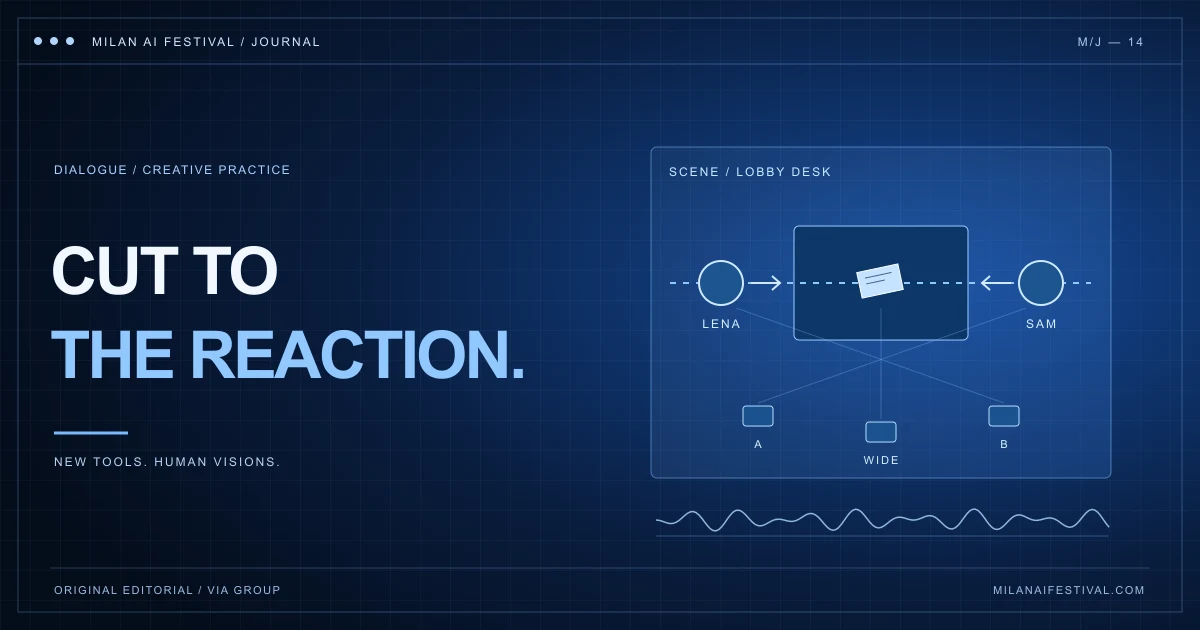
Edit the conversation as a continuous performance. Map where both characters stand and look, time the dialogue before committing to close-ups, and cut to the listener when a line changes what they know. Match shots at the edit points and use consistent room tone to connect the voices across the cuts.
Find the moment the conversation changes
In this fictional exercise, a building porter named Lena faces a courier named Sam across a lobby desk. Lena says nobody signed for a missing parcel. Sam slides a signed receipt across the desk. The scene turns when Lena recognises the initials and realises Sam has a record of who took it.
Play that exchange with still images and a scratch recording. Try two timings for Lena’s response: an immediate question and a pause before she speaks. The first can suggest she has a prepared answer. The second gives the audience a chance to watch her decide what to say. Choose the interpretation you want before asking for a particular facial expression or regenerating a mouth movement.
Keep the draft dialogue on its own tracks. Mark the line, the receipt sliding into view, the glance and the response as separate beats. This lets you move one event without committing the whole scene to the timing of a generated clip.
Draw the axis and write down the eyelines
Sketch the desk from above and draw a line between the characters. Choose a camera side for the wide shot and both close-ups. Adobe’s guide to the 180-degree rule shows how staying on one side of that line preserves the characters’ apparent positions when the camera angle changes. Adobe’s guide to the 180-degree rule
In the exercise, the wide shot puts Lena on screen left looking right and Sam on screen right looking left. Carry those directions into the close-ups and specify the gaze height. If Lena looks down at the receipt, record that as a separate action, then show the receipt where the wide shot placed it. A close-up can match the character reference perfectly while pointing their eyes towards the wrong place.
Use the wide frame as a reference for details that the edit will expose: which shoulder is closer to camera, the light from the front window and which hand pushes the receipt. Check visible text and asymmetric details before mirroring a clip to fix a gaze. A mirrored shot might restore one direction while reversing a sign or changing the hand that made the gesture.
Build coverage around the listener
Start with a wide view, one useful angle on each character and an insert of the receipt sliding into view. Give each take a function. Sam’s shot can establish that she listens without interrupting. Lena’s reaction can hold the moment she sees the receipt. Add another angle when it supplies a missing piece of the exchange.
Try keeping the image on Lena while Sam asks whose initials are on the receipt. Watch whether Lena’s attention moves from the object back to Sam. Then try the same line on Sam. Compare which version lets the viewer discover the shift in power. The best place to cut may be at a glance or a decision that falls between lines.
Tim Smith’s research on cinematic continuity describes how a cut can carry a viewer’s attention across changing viewpoints. Apply that idea by asking what someone is following at each edit: a glance, a moving hand, a voice or the reaction to a piece of information. The Attentional Theory of Cinematic Continuity
Diagnose a broken cut before generating again
Loop the last moments of the outgoing clip and the first moments of the incoming clip. Check gaze direction, body position and the state of the prop. If the receipt is already near Lena in one clip, cutting to it still beneath Sam’s palm makes it appear to jump back across the desk. Compare different trim points before deciding that the clip itself needs to be replaced.
If both characters seem to look in the same direction, use the wide shot to confirm their relationship and check which close-up departed from the plan. If the receipt placement is unreadable, try a single clean insert tied to the sound of paper sliding. If the cut feels rushed, hold Lena’s reaction slightly longer before changing the composition. Each correction addresses a different cause.
Keep a short note for any replacement: the exact line or beat, the character’s gaze target and what must match on either side of the cut. Use the same approach when the location changes between angles. A guide to spatial continuity in AI films
Give the voices a shared room
Listen to the dialogue with the music muted. If one voice sounds close and dry while the other suddenly has a long echo, the room can seem to change at the cut. Put the voices and background on separate tracks. Match the sense of distance and reverberation, then shape the relative levels so both speakers are easy to understand.
Room tone is the low background sound of a location between lines. Use matching tone to fill gaps that would otherwise drop into digital silence. For the lobby, a quiet steady interior bed can connect the voices, while the entrance buzzer can be a separate event in the mix. Listen to the pause after the receipt stops to see if it still feels like a pause in the same room. Audrey Martinovich’s audio post production workflow
Check mouth timing against the final dialogue where the speaker is visible, especially at the start and end of a line. If the performance reads better on the listener, try moving the picture cut while leaving the speech intact. Align the scrape of the receipt with the visible slide, then check the finished export on headphones and ordinary speakers. For a timeline exercise that varies the picture cut while preserving the speech, see Prompt2Screen’s guide to J-cuts and L-cuts.
Test what the viewer understood
Show the scene to someone unfamiliar with the script. Ask where the characters were positioned, when Lena noticed the receipt and what changed between them. Ask which image or sound gave them that answer. If they follow the geography but miss the revelation, revise the timing of the glance or reaction before asking for more coverage.
Review the export once with sound and once with captions. Check that speaker changes, meaningful sounds and the pause before the response remain legible. Caption and accessibility checks for AI shorts
If the scene is part of a fictional short made primarily with AI tools, compare your finished film with Milan AI Festival’s Best AI Narrative Short category. The published maximum is 20 minutes. Check the festival page for the category description and the official entry listing. Milan AI Festival competition categories